

 Microsoft are posting the Microsoft Dynamics GP 2013 Feature of the Day series on the Inside Microsoft Dynamics GP Blog.
The forty fourth feature they’ve announced is Multitenant SQL Server Reporting Services Reports.
The current version of Microsoft Dynamics GP only supports a dedicated instance of SQL Server Reporting Services for each Microsoft Dynamics GP data instance. With the introduction of the Multi-tenant System Database Architecture, the SQL Server Reporting Services needed to be updated to allow for similar functionality.
With this Multi-tenant SQL Server Reporting Services Reports feature, multiple data instances can be deployed to a single SQL Server Reporting Services instance by allowing the implementer to to deploy the reports to a “tenant” folder.
This folder will be controlled by the reporting administrator only giving the customer access to their reports in the “tenant” folder.
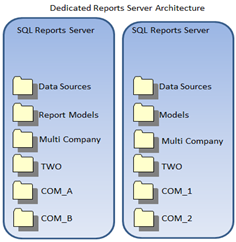
The diagram below shows the current requirements for a dedicated SQL Server Reporting Server instance per data instance;
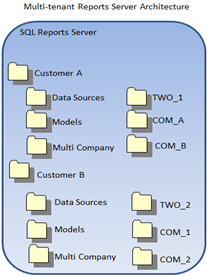
In this second diagram the multi-tenant functionality shows that only a single instance of SQL Server Reporting Server is required for multiple data instances in Microsoft Dynamics GP;
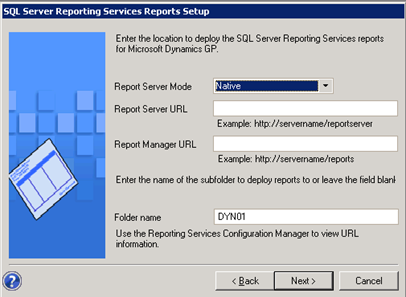
This screenshot shows the deployment window in the Microsoft Dynamics GP setup utility where the type and location of the Reporting Server is specified on installation. There is now an additional field for the “tenant” folder in the Reporting Server;
This new feature is targeted at the following roles:
- System Implementer
- Business System Developer
Learning script available for download.
What should we write about next?
If there is a topic which fits the typical ones of this site, which you would like to see me write about, please use the form, below, to submit your idea.
Has anyone else encountered errors when installing SQL Server Reporting Services Reports with the GP 2013 Dyn Utilities? I’m running on Windows 8 with SQL 2012 Developer edition…SSRS in native mode is running fine when I browse to it…but unable to install GP reports to it.
The error message received is:
“The SQL Server Reporting Services setup information is not valid.”
Hi David,
I’ve been able to deploy the SSRS reports to SQL 2012 from GP 2013 without issue.
Does the user you’re using for the installation have permissions on the SSRS server?
Ian