

 Microsoft have started the Microsoft Dynamics GP 2013 Feature of the Day series on the Inside Microsoft Dynamics GP Blog.
The twenty seventh feature they’ve announced is Email for 64-bit Microsoft Office.
Users will now have the ability to use 64-bit Microsoft Office when utilizing the email functionality within Microsoft Dynamics GP 2013. In previous versions, an installation of the 32-bit version of Microsoft Office was needed in order to use the email functionality.
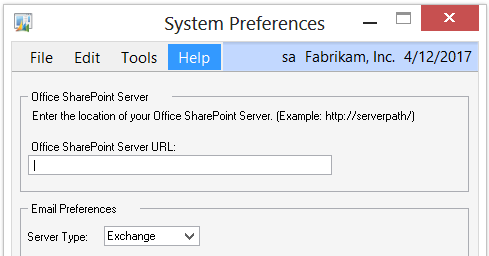
There is now an option in the System Preferences that allows Microsoft Exchange to be selected as the Email Server type. Using Microsoft Exchange will allow the end-user to send emails from Microsoft Dynamics GP 2013 using 64-bit Microsoft Office;
This new feature is targeted at the following roles:
- Accounting Manager
- Accounts Payable Clerk
- Accounts Receivables Clerk
- Bookkeeper
- Operations Manager
- Order Processor
- Purchasing Manager
- Purchasing Agent and Shipping and Receiving
What should we write about next?
If there is a topic which fits the typical ones of this site, which you would like to see me write about, please use the form, below, to submit your idea.
1 thought on “MDGP 2013 Feature of the Day: Email For 64-bit Microsoft Office”